
Description
The 32 vCPU AWS account is the honest starting point. It is the smallest tier that behaves like a working account rather than a demonstration of one, and it is the tier most of our customers should buy — including a fair number who arrive here intending to spend considerably more.
We sell credit for a living. We are still going to tell you that if your infrastructure costs forty dollars a month, this $30 account is the entire answer and you should close the credit page.
What a fresh AWS account cannot do
Signing up for AWS is free, which makes buying an account sound absurd until you try it. The signup is free; the usable account is not.
Cards get declined without explanation. Identity reviews sit in “pending” for days. And the people who make it through meet the real wall: a starter service quota so conservative that the instance the whole project was designed around simply will not launch.
You can file for an increase. It may take days. It may be refused without a reason you can act on. Neither outcome cares about your deadline. Here is how quotas actually work, and why the ceiling is where it is.
What is included
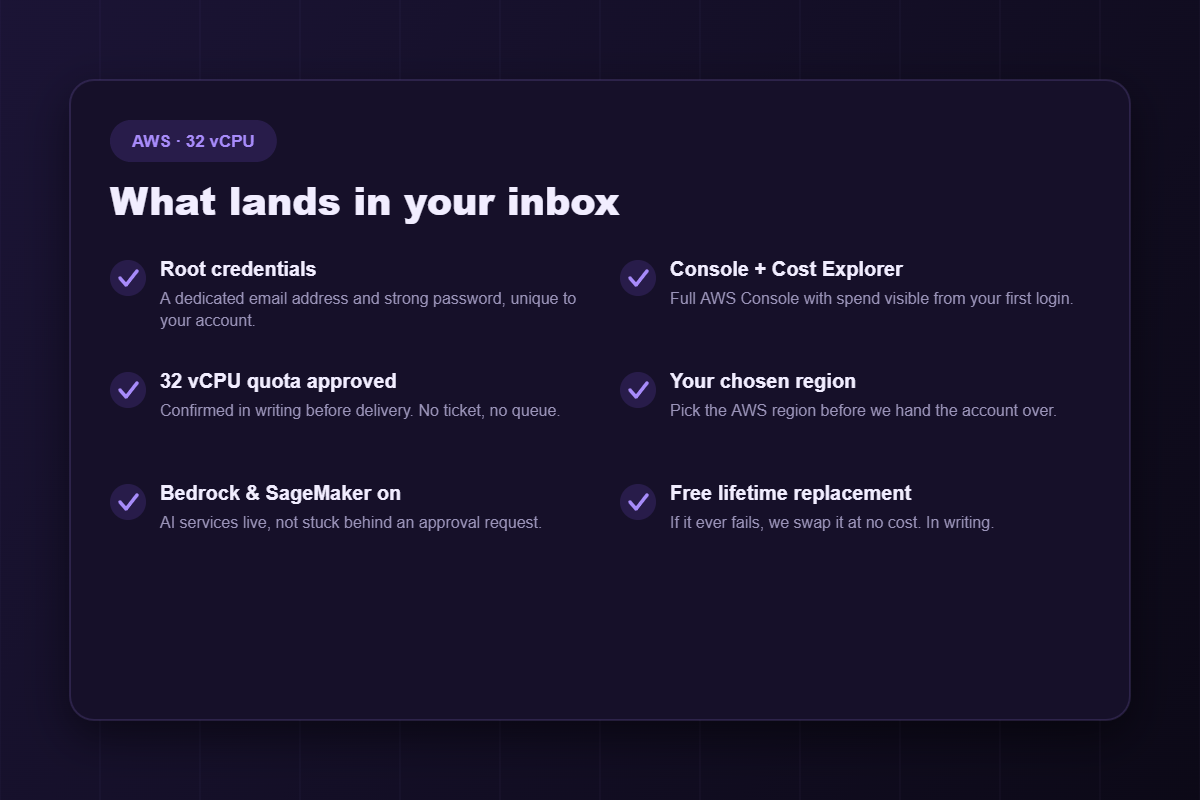
- Root credentials — dedicated email address and strong password.
- Full Console and Cost Explorer access, so spend is visible from your first hour rather than your first invoice.
- A 32 vCPU quota, approved in writing before delivery. Not requested — approved.
- Your chosen AWS region, configured before handover.
- Bedrock and SageMaker enabled, skipping a separate approval queue that catches out a remarkable number of people.
- A free lifetime replacement, written into the order.
What 32 vCPU actually means
Your quota is a concurrency ceiling, not a monthly allowance. It caps what may run at the same instant. One 32-vCPU instance consumes it entirely; so do four 8-vCPU instances. Nothing depletes over time.
This is why the ceiling ambushes people mid-deploy rather than mid-development — a rolling deployment briefly runs the old and new fleet together, and that overlap is exactly where a tight quota bites.
Comfortably inside 32 vCPU
- A production application and API with headroom for spikes
- A database and a cache layer
- Several background workers or queue consumers
- A staging environment close enough to production to be worth having
- CI runners that are not competing with your live service
Outside it
Model training at any real size, high-throughput analytics, rendering, or many parallel client environments. Step up to 64 vCPU when concurrency is the constraint, or 128 when raw capacity is.
The four tiers
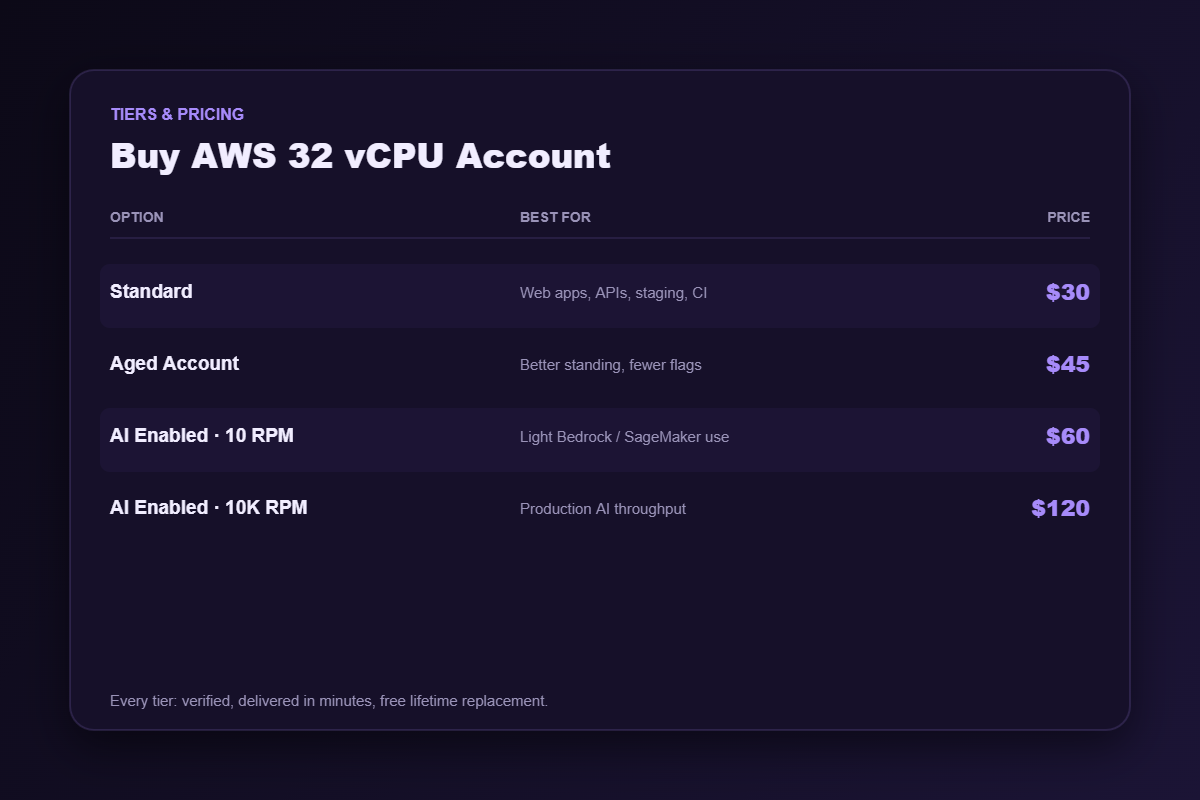
Standard — $30
Freshly verified, quota approved. The correct choice for the overwhelming majority of buyers.
Aged Account — $45
Genuine history behind the account. Established accounts attract fewer automated risk flags — worth the extra fifteen dollars if you have been burned before by an account behaving oddly under scrutiny.
AI Enabled · 10 RPM — $60
Bedrock and SageMaker at light request throughput. Prototyping with foundation models, evaluation, low-volume inference.
AI Enabled · 10K RPM — $120
Much higher AI throughput. If you are shipping an AI feature to real users, the rate limit — not the vCPU count — is what will actually stop you.
Delivery and guarantees
Automated fulfilment. Median around eight minutes from cleared payment to a working console, at any hour, because nobody has to wake up. If the account fails afterwards, message support and we replace it free — a written term of every order.
Account hygiene in the first fifteen minutes
- Change the root password and store the new one in a password manager.
- Enable MFA on the root user before you touch anything else.
- Create an IAM user for daily work. Operating as root every day ends badly, eventually.
- Set a billing alarm — not a budget you glance at, an alarm that emails you.
- Confirm the region matches what you ordered before deploying into it.
A seller who hands over credentials and says nothing about this is not looking after you.
Frequently asked questions
Is it verified before delivery?
Yes — identity and billing checks completed before listing. You are not inheriting somebody’s stalled signup.
Does the quota work in any region?
No. Quotas are granted per region, and this is the most common expensive mistake in cloud procurement. Tell us where you deploy before ordering.
Should I buy a bigger tier to be safe?
Almost certainly not. Sum the peak concurrent vCPU across everything that runs at once, add about a third for spikes and deploys, round up. If that lands under 32, buy this. Send us the workload if you want a second opinion — including the version where you spend less.
Do I need credit as well?
Only if the bill, rather than the ceiling, is what hurts. This explains the difference.
Why buy rather than just sign up?
AWS costs nothing to join, so be clear-eyed about what you are actually purchasing here. You are buying back the days that verification and quota approval would otherwise consume, and you are buying certainty about an outcome the signup process pointedly refuses to guarantee.
For a hobby project with no deadline, that trade is probably not worth it, and you should go and sign up. For an agency with a client, a team mid-sprint, or a product that has to ship this month, it usually is. We would rather you made that call with clear eyes than because a product page pressured you into it.
The most common mistake at this tier
People buy 32 vCPU, deploy successfully, and then get a bill they did not expect — and conclude they bought the wrong thing. They did not. They solved their access problem correctly and then discovered they also had a cost problem.
Those are two separate purchases. If your AWS bill turns out to be the thing that hurts, come back for credit; it draws the bill down rather than raising the ceiling. Buying a bigger compute tier will not help with cost at all, and plenty of sellers will happily let you make that mistake.
Related
More concurrency: 64 vCPU, 128 vCPU. Lower bill instead: AWS account with credit. Everything else: AWS accounts, cloud accounts. And if a cheaper provider fits better, we will say so.
Disclaimer: AWSCreditShop.com is an independent reseller and is not affiliated with, authorised by, or endorsed by Amazon Web Services, Inc.. All trademarks belong to their respective owners. Buying credit lowers what you pay for compute; it does not transfer responsibility. You remain accountable for operating within the platform’s terms of service and for whatever you deploy.
Reviews
There are no reviews yet.